 CITSPOS
1. Lock the app 锁定 App
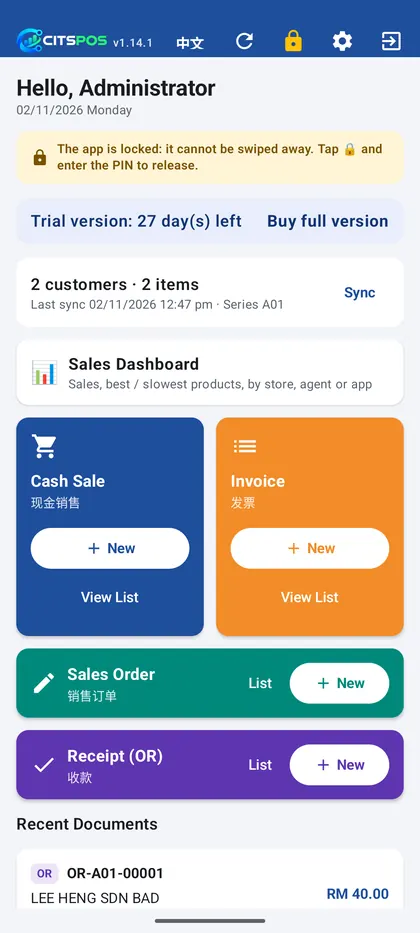
Tap 🔒 at the top of the app's home screen. The app stays fully usable: staff keep billing, but it cannot be swiped away by accident and customers cannot leave it. A banner shows that it is locked.
在 App 主页上方按 🔒。App 照常可用:员工继续开单,但不会不小心被划走,顾客也离不开 App。上方会显示“已锁定”提示。
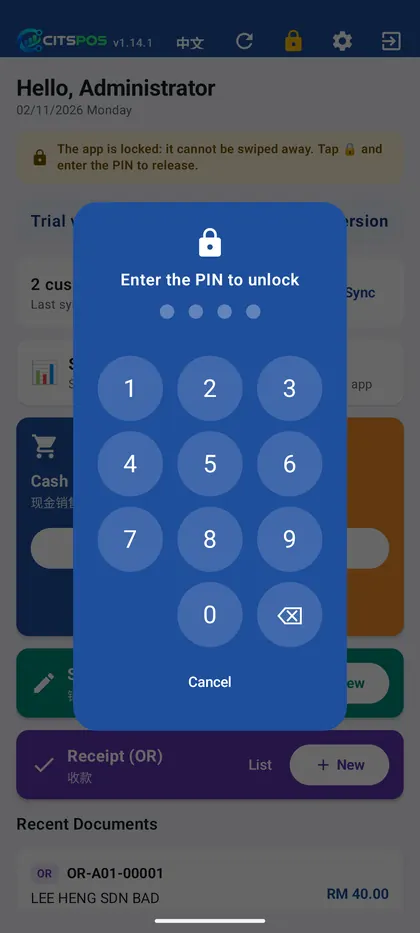
To release it, tap the amber 🔒 and enter the PIN. The default PIN is 0000; an administrator can change it in Settings → Lock screen PIN.
要解除,按黄色的 🔒 再输入密码。默认密码 0000,管理员可在「设置 → 锁屏密码」更改。
2. Normal phone or dedicated device? 一般手机还是专用机?
| Normal phone · 一般手机 | Dedicated device · 专用收银机 | |
|---|---|---|
| How it locks 锁定方式 | Android screen pinning Android「固定应用」 | Full kiosk lock 完全锁定 |
| Can it be left? 能否离开 | A quick swipe up may still leave the app 快速上滑仍可能离开 | No: Home, swipe up and Recents all stay in the app 不能:Home、上滑、最近应用都离不开 |
| Setup 设定 | Nothing 不用设定 | One-time, with a computer (below) 用电脑设定一次(如下) |
3. Set up a dedicated counter device 设成专用收银机
For a tablet or phone that stays at the counter.
- Factory-reset the device, or make sure no Google (or other) account is signed in. Android only allows this on a device without accounts.
手机 / 平板先恢复出厂设置,或确认没有登录任何 Google(或其他)账号。Android 规定有账号的设备不能这样设定。 - Install CITSPOS from the download page and connect it to your DAXONET AC Gateway.
从下载页安装 CITSPOS,并连接 DAXONET AC Gateway。 - Turn on Developer options → USB debugging (Settings → About → tap Build number 7 times to show Developer options).
开启「开发者选项 → USB 调试」(设置 → 关于手机 → 连按「版本号」7 次可显示开发者选项)。 - Connect it by USB to a computer with Android platform-tools and run:
用 USB 线接上装有 Android platform-tools 的电脑,运行:adb shell dpm set-device-owner com.cits.kaidan/.ui.lock.LockAdmin
- When it shows
Successit is done. Turn USB debugging off again if you like. From now on, while locked, the app cannot be left at all.
看到Success就完成了,可再关掉 USB 调试。之后按 🔒 锁定时,完全离不开 App。
Note: on a dedicated device CITSPOS cannot be uninstalled without a factory reset. Do not do this on staff's own phones.
注意:设成专用收银机后,CITSPOS 不能直接卸载(要恢复出厂设置)。员工自己的手机请不要这样设定。
Troubleshooting 常见问题
“Not allowed to set the device owner because there are already some accounts on the device” — remove all accounts in Settings → Accounts, or factory-reset, then run the command again.
提示设备上已有账号:到「设置 → 账号」移除所有账号,或恢复出厂设置后再运行。
“adb: command not found” / no device — run the command inside the platform-tools folder, and accept the “Allow USB debugging” prompt on the device.
找不到 adb 或设备:在 platform-tools 文件夹里运行,并在设备上允许 USB 调试。
Forgot the lock PIN — contact your administrator or ask us.
忘记锁屏密码:请联络管理员,或在问答页提问。